AeroTouch V6 Touch Display

GM75E10AZD、GM86E10AZD
尺寸
  • 75"/86" NEW
  • AI Intelligent Stroke Correction
    Cross-platform Annotation Software Optimization
    Android 14 System

Optional System

iPTS – Cloud Whiteboard Live Broadcasting (Optional)
iMDS – Remote Centralized Control Management System (Optional)

AVACAST Wireless Casting & Video Conferencing

AVACAST Wireless Casting – Software
AVACAST Wireless Casting – User Manual
AeroTouch V6 series

With the intuitive interface of a large interactive touch LCD display, teachers can use cross-platform whiteboard annotation software and wireless casting features without the need for a computer. This enhances interactive learning (Interactivity), integrates diverse learning resources (Integration), and inspires creativity and engagement (Inspiration), making it an essential tool in the flipped classroom.

  • Wireless Casting
  • Cross-platform Annotation Software
  • Efficient Dual-window Mode
  • AI Intelligent Correction
Long-press Touch Command:
Long-press with two fingers to activate the floating ball.

(Whiteboard Writing) Palm Press to Use as an Eraser
Five-finger gesture to put the screen to sleep

Picture-in-Picture (PIP)
The signal source device can be controlled directly from the touch panel, and the screen size and position can also be adjusted.
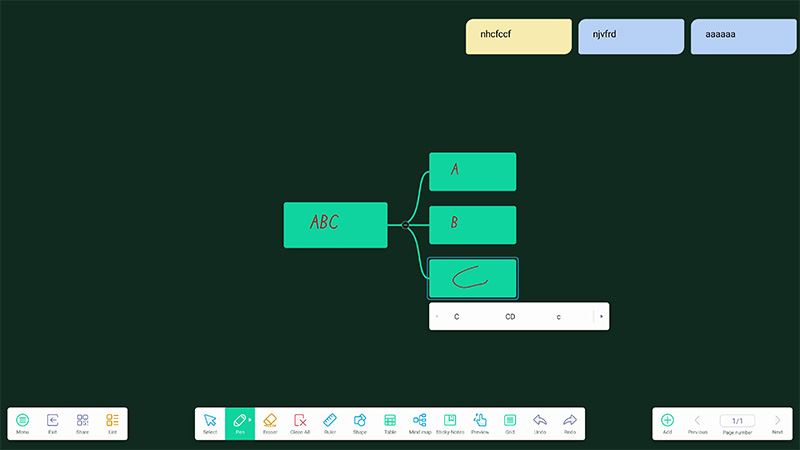
 
Automatic Brush Stroke Correction
 
Whiteboard Writing Features
  • Select Object
  • Brush Size and Color
  • Eraser Size
  • Clear All Content
  • Ruler Tools (Vertical & Horizontal)
  • 2D/3D Geometric Shapes
  • Multi-user Simultaneous Operation
  • Custom Table Fields
  • Browser
  • Tree Diagram (Mind Map)
  • Globe
  • Sticky Notes (or Notes)
  • Canvas Panning and Zooming
  • Text Grid (Four-line Guide)
  • Undo / Redo
Wireless Casting
  • Multi-screen Sharing
    Teaching Mode — Wireless Made Truly Convenient
  • Multiple Screens
    Window Sharing & Split View — Easy and Simple
  • Reverse Control Annotation
  • Two-way Remote Control with Synchronized Activation
Software & Hardware Features
  • File Manager
  • Customizable Input Source Names
  • Network OTA Updates
  • Picture-in-Picture (External Source with Reverse Control)
  • Wired Network Sharing Hub
  • Wireless Casting Remote Control
  • Multi-platform Device Sharing
  • Built-in Android 14.0 System
  • 八核心處理器
  • 16GB高容量記憶體
  • 256GB大容量儲存空間
  • 多視窗模式可同時開啟多項功能
Brand and Model Number
(Brand and Model Number)
AeroTouch-GM75E10AZD AeroTouch-GM86E10AZD
LCD Panel
Size 75 86
Resolution 3840 x 2160
Aspect Ratio 16:9
Brightness 450cd/ ㎡
Contrast Ratio 5000:1
Viewing Angle (Horizontal / Vertical) 178°/178°
Response Time 8 ms
Backlight Direct-lit LED
Backlight Lifetime 50,000 hours
Touch
Technology & Touch Points 40-point Infrared Touch (IR Touch Technology)
Touch Resolution 32767 x 32767
High-precision Writing ≧ ɸ1mm
Supported Operating Systems & Touch Points Win 11/10/8/7: 40 points, Win XP: 1 point, Mac: 1 point, Mac:1點,Android: 20 points, Linux: 1 point, Chrome: 1 point
Tempered Glass AG Anti-glare Tempered Glass, 4 mm / 9H Hardness
Input Ports
Video (Analog) VGA x 1
Video (Digital) HDMI 2.0 x 3, DP 1.2 x 1
Audio Audio in(3.5mm)x1,Mic(3.5mm)x1
Multimedia (Android) UUSB 3.0 Type-A × 5, USB-C × 2, Micro SD Card Slot × 1, USB 2.0 Type-A × 1
Multimedia (All Channels) USB 3.0 A-type x 5
LAN RJ45x1
Screen Control RS232C (In/Out)x1
OPS Computer Slot Supports up to 4K/60 fps
Output Ports
Video (Digital) HDMI 2.0 x1
Audio SPDIF (Optical) x 1, Earphone x 1
Touch USB 3.0 B-type x 3
LAN RJ45x1
Wireless Receiver
Wi-Fi Wi-Fi 6
Speakers
Power Output Built-in 20W × 2
Device Power Consumption
Input Voltage AC100-240 V 50/60 Hz
Typical Power Consumption ≦ 350W ≦ 450W
Standby Power Consumption ≦ 0.5W
Environmental Conditions
Operating Temperature 0-45 ℃
Operating Humidity 10-90% RH
Dimensions & Weight
Dimensions (W × H × D) 1707.52x 1041.93x 87.90mm 1953.2 x 1180.02 x 88.1 mm
VESA Mounting Holes 600 x 400 mm 800 x 400 mm
Net Weight 54kg 69kg
Android
System Version Android 14.0 (Octa-core Processor A73 × 4 + A53 × 4 / 1.5GHz, Max2.2GHz)
RAM 16 GB
ROM 256GB

  • US Power Cord 3m × 1
  • HDMI Cable 3m × 1
  • Touch USB Cable 3m × 1/li>
  • Remote Control × 1
  • Touch Pen × 2
  • Quick Start Guide × 1
  • M8 Screws × 4
  • Wall Mount Bracket × 1
Product Notes:
1. Before using the product, please read the user manual included in the accessory box carefully and keep it for future reference.
2. Please use the power cable and accessories provided with the product.
3. Do not bend, twist, or pull the power cord with excessive force.
4. For installation, please follow the “Wall Mount Installation Guide” included with the wall mount bracket.
5. If the product will not be used for an extended period, please turn off the power and unplug it.
6. To prevent screen fogging, place the product in the same environment (powered off) for 1–2 hours before turning it on, allowing its temperature and humidity to stabilize and match the surroundings.
Catalog Download